This year students have been learning about and putting into practice the 7 Habits of Leadership from Stephen Covey’s book – The Leader in Me. Below is an end of the year video compiled and produced for students to view on our schools news network – RFBTV.
Archive for the ‘Ed Tech Integrated’ Category
During the RFBMS Winter Fine Arts Night, technology students displayed inventions they had designed. Guests were asked to vote on the invention they would use most. Congratulations to the 2013 Invention Convention winner, Kathryn B.

During the RFBMS Spring Fine Arts Night guests had an opportunity to stop by and play fun and engaging Scratch games created by Bumpus Middle School computer science students. You can play these games by click HERE.

Students recently showcased their creativity & programming skills by creating amazing games using Scratch 2.0. Many of these middle schools students were being introduced to Scratch for the first time while others had only little experience with the program. Ultimately, they worked hard to design a multilevel and/or scored challenging and engaging game and exceeded all expectations! Please visit the SCRATCH GAME PAGE to play some of the student games. One variation of the Scratch game design assignment rubric is provided below…

Students use Scratch 2.0 for Middle School Game Design…#Scratch #ScratchEd
Posted: February 27, 2014 in Ed Tech IntegratedRecently, students were tasked with designing multilevel games using Scratch 2.0. Many have chosen to recreate some of the classics like space invaders and asteroids, while others are creating more modern games involving racing or mazes. Students are doing great work and it will be exciting to test our finished products…Stay tuned for some exclusive video!! Until then, enjoy the pictures below (click the picture for a closer look):


Are you an educator looking for online digital storytelling tools, check out the nine resources below. Click on the picture to explore each service further…
1 – Make talking avatars: Voki.com lets you create talking, animated characters with the site’s text-to-speak option or by recording your own voice. Great for short autobiographies and other monologues!

2 – Author a digital pop-up book: With ZooBurst.com, students can turn their stories into 3D-style pop-up books.

3 – Animate and direct your own cartoons: GoAnimate makes it easy to create fully animated cartoons. Have students animate their own stories as well as retell those they read in class.

4 – Write interactive stories: Use InkleWriter.com to create interactive stories similar to the popular “Choose Your Own Adventure” series.

5 – Help students get published: StudentPublishing.com has a program for schools in which students digitally create a book that can be produced as a hard copy.

6 – Get comical: MakeBeliefsComix.com has great creative writing prompts, story ideas, a simple comic creator and more to help your students learn to love writing.

7 – Get even more comical: Use Pixton.com to easily create sophisticated comic strips and graphic novels.

8 – Combine art and storytelling: Kerpoof.com has art and storytelling tools including a story maker, movie maker and card maker to unleash your students’ creativity.

9 – Take it to the fourth dimension: Meograph gives you the ability to create interactive stories that include voice, videos, maps, photos and links all mashed up into one presentation.

Information taken from the Utah Education Network – visit UEN at http://www.uen.org for some incredible resources
Looking for a way to find out what your kids really know or need more work on in computer applications?? I am currently utilizing the data I collected from this assessment tool to provide customized instruction to students who need it. Learn more below…
WHAT IS FORMATIVE ASSESSMENT: We use the general term assessment to refer to all those activities undertaken by teachers – and by their students in assessing themselves – that provide information to be used as feedback to modify teaching and learning activities. Such assessment becomes formative assessment when the evidence is actually used to adapt the teaching to meet student needs. –Paul Black & Dylan William (1998) -Quote above taken from So What Do They Really Know? by Cris Tovani
Are you teaching intro to computer applications, computer applications, or some other course where basic computer knowledge is necessary? If so, I highly recommend utilizing the Northstar Online Digital Literacy Assessment as a formative assessment tool to find out what your kids already know or what they have yet to learn. This is a free resource that is completely digital, very user friendly, and does not require registration or login. They offer six different assessments which include: 1-Basic Computer Use, 2-World Wide Web, 3a-Windows 7, 3b-Mac OS X, 4-Using Email, & 5-Microsoft Word. Furthermore, the assessments work on any type of computer, can be taken in Spanish, in case you have Spanish speaking students, and provide ALL questions read aloud and written to assist with students who might be struggling readers.

Below is a typical question from Module 1: Basic Computer Use

Below is a typical question from Module 1: Basic Computer Use

Below is a typical question from Module 1: Basic Computer Use

I purposely missed the below question to provide an example of how the assessment results page will reflect my lack of knowledge in this area — see last graphic below

Below is the vital Module 1 results page. You can have students print this or save it as a PDF to turn in. After purposely missing question 39 shown above, the results page accurately reflects that I need to improve on my “use of the recycle bin for trashing and retrieving items.”

CLICK HERE TO TRY THE NORTHSTAR ONLINE DIGITAL LITERACY ASSESSMENT FOR YOURSELF!
Student-Created Infographics – Assignment: Highlight Technology in 2039 or Vital Character Traits…
Posted: February 6, 2014 in Ed Tech IntegratedThese days, infographics are EVERYWHERE – including several on this blog. Well, now, I am very proud too add several more, made by my incredibly talented and creative students!! Students were tasked with highlighting tech 25 years from now or vital character traits and were asked to present their final product in class. While students had five templates to choose from, they were required to replace all content with researched/relevant information-pictures. Please enjoy the small sampling below:


Rubrics below:


The Massive Chasm (Student & their tech experience at home vs. at school…)
Posted: February 6, 2014 in Ed Tech Integrated“There is a massive chasm which exists between a student’s technological experience at home, and the experience (or lack thereof) which they receive at school. At home students are constantly engaged with technology, be that YouTube, iTunes, using an App on their iPad or playing a video game. These can no longer be seen by educators as a “waste of time”. – See more at: http://www.mrwashburn.net/virtual-worlds-and-real-life-an-autoethnographical-journey-in-online-gaming/

I love the honest assessment above! THE ANSWER: It is time we consistently utilize tech and tech resources at school that students can’t wait to get home and use. Want to extend learning beyond the classroom?? Technology is how you do it!

Created by Knewton and Column Five Media
Raspberry Pi & Google Coder – #RaspberryPi #google #coder
Posted: January 18, 2014 in Ed Tech IntegratedWell, I have officially started writing code on my Raspberry Pi using Google Coder. The first step was setting up my Raspberry Pi on my wireless network. After ensuring it was connected to my wireless network, it was time to install the Coder SD card. After accessing the platform (see below – “Keith’s Coder”) on my MacBook Pro, I decided to install an app called Comic Creator and create a website to honor my student’s recent programming accomplishments. I did this by modifying existing HTML and CSS code (seen below – “Your Title Here” template) and the ultimate outcome, a website of Hour of Code pictures (“Hours of Code @ BMS”). The before and after process is documented below:


Hour of Code Yields Amazing Results – #code.org #hourofcode
Posted: December 27, 2013 in Ed Tech IntegratedTags: #code.org, #hourofcode
The results of Code.org’s Hour of Code initiative summarized in the infographic below:


I just purchased the CODER Pack for Raspberry Pi. “Coder is a free, open source project from Google that turns a Raspberry Pi into a simple platform that educators and parents can use to teach the basics of building for the web. New coders can craft small projects in HTML, CSS, and Javascript, right from the web browser.” This pack has all you need to get started! ” It includes the following:
Each order comes with:
- Raspberry Pi Model B – has an Ethernet port, two USB ports and 512 MB of RAM
- Adafruit Pi Case – Keeps your Pi cozy and safe
- Mini WiFi adapter – Good range, and a compact design, this will be how you connect to the Pi proxy
- MicroUSB cable – 3 feet long, great for powering your Pi
- 5V 1A power adapter – specially designed for the Pi
- 4 GB SD Card with Google CODER v4 – a 4GB card with the Coder image pre-installed and ready to rock
For more information visit:
http://googlecreativelab.github.io/coder/
To learn more or to order click the CODER image above or go to: http://www.adafruit.com/products/1538
I look forward to experimenting with this incredibly small (the size of a credit card), but impressive microcomputer over the holidays. I hope to integrate this technology into my class very soon. I will post updates as they become available. In the meantime, I have taken some pictures of my purchase above.
Sphero 2.0 – A Robotic Ball and much more… #sphero
Posted: December 24, 2013 in Ed Tech IntegratedTags: #sphero


Recently, I was introduced to Sphero 2.0 by chance, while partaking in some professional development with colleagues at a neighboring school in my district. During our visit, we were fortunate to be able to meet and speak with a well-known University of Alabama computer science professor, who happened to take his Sphero from its bag and demonstrate some of its capabilities. I stood in awe and amazement of the technology. After briefly discussing the educational benefits and possibilities, I was determined to own one. A little less than a week ago, I visited Brookstone and purchased the Sphero 2.0 for slightly over $100. After a week of experimentation and testing, I can say without hesitation, this was a great purchase. I am certainly convinced that the Sphero 2.0 has tremendous educational value, especially when it comes to teaching basic robotics and/or programming. Sphero 2.0 is the second Sphero model and evidently includes numerous enhancements from the original model. The smartphone-controlled robotic ball can be used with a numerous and growing selection of Apps downloaded from the App store on your phone and/or tablet/iPad. Sphero is programmable and can be used to teach coding or used for augmented reality (AR) and mixed-reality games, among other things. As I learn more, further updates will be provided. Sphero also currently offers a discounted package purchase to educators. To purchase your Sphero or to learn more, visit: http://www.gosphero.com/

Blown to Bits is required reading for any individual interested in understanding the digital age in which we live. Entertaining and enlightening, it will forever change the way you think about and interact with technology today!! I look forward to using this vitally important text as a regular reference with my classes. To download or buy the book, click on the image above!
Students Learn Programming with Code.org Tutorials / #hourofcode
Posted: December 22, 2013 in Ed Tech Integrated


Robin Hunt from ThinkData Solutions speaks to students…
Posted: December 22, 2013 in Ed Tech Integrated
Robin Hunt from ThinkData Solutions was kind enough to take time out of her day to speak to our 7th grade students at Bumpus Middle School. Ms. Hunt is President/CEO of ThinkData Solutions in Birmingham, Alabama. Her job includes managing the day to day operations at ThinkData, which specializes in helping clients with process and data management to solve specific business challenges. Her meaningful and engaging presentation challenged students to explore their technical skills and creative ability. We thank Ms. Hunt for her leadership and for taking the time to visit with students!
15+ Ways of Teaching Every Student to Code (Even Without a Computer)
Posted: December 22, 2013 in Ed Tech IntegratedDecember 4, 2013
According to Code.org, 90 percent of U.S. schools are not teaching any computer science. Eyebrows have been raised this year as the U.K. passed a plan to educate every child how to code.
In my opinion, parents of every student in every school at every level should demand that all students be taught how to code. They don’t need this skill because they’ll all go into it as a career — that isn’t realistic — but because it impacts every career in the 21st century world. Any country recognizing that will benefit in the long term. Here’s how you can start.
Education Objectives for the Hour of Code
The Hour of Code initiative has a goal of more than 10 million students trying computer science for just one hour in school during Computer Science Education Week this year (December 9-15). In my classroom, I have three objectives with the Hour of Code, but you can use them to celebrate, teach and inspire analytical thinking any time of year.
1. Help students see computer science as an important aspect of being well educated, no matter their profession. I’ll be showing the Code Stars video:
2. Help parents and other educators see Computer Science as needful in our school. I’m using the video “What Most Schools Don’t Teach”:
3. Give my students another opportunity to program for at least an hour. Because I have choice in my classroom, I’m going to use this blog post to give my students a choice of how they’ll program. We’ll debrief and share the day after the Hour of Code to see which we want to use more deeply in the spring.
With the following resources, you can teach programming with every student and every age.
Apps and Tools to Teach Coding All Year Round
Code.org Resources
Code.org has suggested resources for educators, unplugged lessons (those not requiring computers), and has just released tutorials to help you teach computer science to kids of all ages. If you want to participate, sign up on their site to register your school.
Teaching Coding to the Youngest Students
- Tynker Games: Use these age appropriate games to teach your elementary students coding concepts. From Puppy Adventures to Math Art and Maze Craze, you’ll find games your students will enjoy. Grades: 1-8
- Kodable has made news as an iPad app targeted to students as young as kindergarten age. The first 30 levels are free, more than enough for an hour of code. They recommend this for age 5 and up, but there are stories of kids even younger using the app with great success to learn to program. iPad schools will want this app on every device.
Teaching Coding to Age 8 and Up
- Hopscotch is the free iPad app for upper elementary and above. Wesley Fryer has created and excellent free ebook for Hopscotch in the classroom, full of challenges that you can use with students. He also recommends activating the emoji keyboard (go to Settings > General > Keyboards) for use with the program.
- Scratch is a programming game that can be downloaded or used on the Web and is supported by MIT. They’ve got a powerful Hour of Code tutorial where students can program a holiday card in their web browser. Or, if you want options for other times of the year, use the one-hour “Speed Racer” activity to teach your students Scratch. Teachers can watch this tutorial video to learn how, visit Scratch’s Hour of Code Ideas forum to ask questions, or search “Hour of Code” on the forum for lesson plans using everything from coordinate geometry to Latin. Scratch is considered acceptable for beginners.
- Alice is another popular platform with a unique storytelling aspect. You can use it to create a game, tell a story or make an animated video. Like Scratch, Alice is free and supported by a powerful community of educators. There are two versions of Alice. (The newer 3.0 version still has a few bugs but also sports many new, very cool animations.) This longstanding platform is a rewarding tool that kids will want to keep using past the initial hour. Alice is considered more for the intermediate student, but experienced teachers can use this with beginners.
- Kodu is another programming tool that can be easily used on a PC or XBOX to create a simple game. There’s also a math curriculum. This is one method that Pat Yongpradit, Code.org’s Director of Education, used in his computer science classroom. (I’ve used it as well.)
- Gamestar Mechanic offers a free version that you might want to use for your hour, but if you fall in love with it, the educational package allows teachers to track student progress, among other features. The company supports educators, and there’s also an Edmodo community that shares lesson plans and ideas for the tool, along with videos and a must-see teacher’s guide.
- Gamemaker is an option if you want to make games that can be played in any web browser. The resources aren’t as comprehensive and the community isn’t vibrant, but this one has been around awhile and might be fun for a more tech-savvy teacher.
- Live Code is used heavily in Europe. There are also some U.S. schools using it on iOS and Android devices. With free downloadable materials by age level, this is an option for many BYOD high schools.
- Minecraft.edu is an option that lets you install and use Minecraft in the classroom. While this does require some purchase and setup, Minecraft seems to be gaining in popularity among educators as an in-house, 3D world-programming environment that kids love. Minecraft.edu has a Google group and best practices wiki.
Flip Your Classroom or Use an Existing Curriculum
- Khan Academy: Follow the Hour of Code lesson plan tutorial on Khan Academy for ways to teach your students. These lessons are for older students with one computer each, or they could be adapted to a flipped class model.
Use Hardware and Make Something Cool
Programming, making and creating have never been easier. If you’re getting into the Maker movement or #geniushour, these are staples for your classroom. While they may take longer than an hour of code, they’re definitely something 21st century schools can use, because students are programming and building with their hands.
- The Raspberry Pi is an inexpensive computer. While Kickstarter’s Kano kit isn’t available yet (but is likely what we’ll be talking about next year), there are so many things kids can make with the Raspberry Pi. After setting one of these up with my 15-year-old nephew, I recommend that the teacher be a tad more advanced! This is definitely a tool I’d use in my classroom. (Cost for a kit runs less than $100.)
- An Arduino is basically a motherboard that you can make, plus a programming kit. I have one of these in my classroom, and the students are fixated for hours. Several of my students have spent the last eight weeks programming and tinkering with the boards. That said, don’t share them between classes, as students will be undoing each other’s work. (Cost for a kit is around $100.)
- Lego Mindstorms are part of my curriculum every spring. Students love Legos! I have six older Mindstorms kits that we’ve used for years. The newer NXT kits even have cool robots that can be made and programmed. This product has been around for years, so there are many resources for teachers. If you purchase an older kit on eBay, make sure it will work with newer operating systems.
How Do You Teach Coding in Your Classroom?
In this post, you’ve seen 15+ ways to teach coding in your classroom, but there are many more. Please join the movement to help reach every child by sharing your story in the comments — or a link to your favorite resources for teaching kids to code..
This article and much more can be found at: Vicki Davis @cool…’s Blog
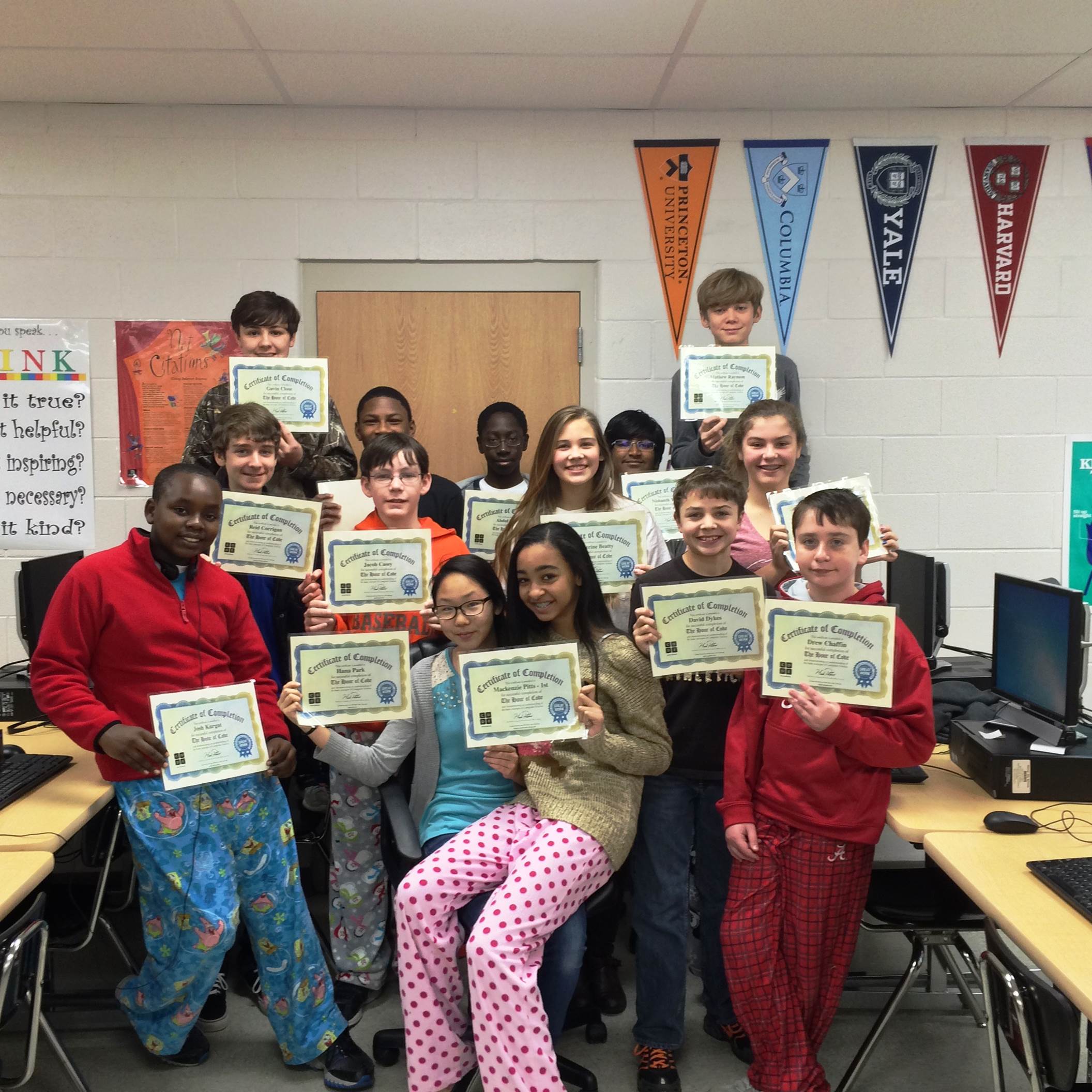
Sixteen Bumpus Middle School students completed Code.org’s K-8 Intro to Computer Science Course December 9th-15th in celebration of Computer Science Education Week. The multiple hours of coding conquered by each student resulted in a choice of Code.org’s featured prizes and a certificate of recognition, while I was awarded a $750.00 DonorsChoose.org classroom funding grant. The award-winning students worked hard and enjoyed this meaningful learning experience. Those completing the course are pictured below in the order that they appear (left to right, bottom to top): Josh Kurgat, Hana Park, Mackenzie Pitts, David Dykes, Drew Chaffin (Row 2) Reid Corrigan, Jacob Casey, Katheryn Beatty, Victoria Nicoll (Row 3) Gavin Close, Patrell Williams, Abdul Diane, Nishanth Yuvaraj, Mathew Raymon, Brandon Waldo (not pictured) & Stefan Raschke (not pictured). CONGRATS TO THESE STUDENTS! #hourofcode

She started programming at the early age of 9, started her first internet company at the age of 13, finished high school at the age of 15, and studied computer science at the University of California, Berkeley. Thankfully, Jessica Mah also remembers how it all began, sitting in front of a computer at an early age, learning how to write code. On Thursday, December 19th, Ms. Mah took time out of her busy schedule to Skype with 8th grade students at Bumpus Middle School. She briefly discussed her background and experience in computer science and helped students to better understand how one goes from basic programming to building your own website or starting your own tech company. She also answered numerous questions from inquisitive students. Bumpus Middle School thanks Ms. Mah for taking time out of her day to inspire students and for serving as an amazing role model that they can one day hope to emulate. THANK YOU!
 Originally from: http://envisioning.io/education/
Are Kids Who Make Their Own Video Games Better Prepared For The Digital Future?
Posted: December 15, 2013 in Ed Tech Integrated “Stemville” a game created by STEM challenge winner, Nicolas Badila (Middle School).
It is easier than you might think for kids to make their own video games. Gamestar Mechanic is a great web based place for younger children to start. Kodu, Gamemaker, and Scratch all offer simple interfaces for more experienced kids.
When kids design their own video games, they are engaged in “learning-by-making.” Project based learning is a constructive experience. It is active rather than passive. It involves creation rather than consumption.
Coding, video game making, and interactive expression will be central to education’s future–not only because these activities encourage the STEM (science, technology, engineering, math) skills involved in digital content creation, but also because game creation nurtures the kind of humanistic personal skills that we expect from successful contributors to society.
One 2011 study showed significantly increased deep learning and intrinsic motivation when kids made their own games. Another 2009 study showed that when kids created their own game based quiz questions, they demonstrated increased content retention and better performance on standardized tests. A 2010 study “found evidence to indicate that the game-authoring activity stimulated higher order thinking skills.“
Some kids are already making their own games. The Joan Ganz Cooney Center and E-Line Media just announced the 2013 winners of the National STEM Video Game Challenge. Sixteen middle and high school students (out of 4000 entries) took the top honors. “The competition aims to motivate interest in science, technology, engineering and math (STEM) among students in grades 5-12 by tapping into their enthusiasm for playing and making video games.” The winners (listed at the end of this article) receive fully loaded AMD-powered laptop computers.
Inspired by President Obama’s “Educate to Innovate Campaign,” the National STEM Video Game Challenge selected twenty-eight youth as winners in 2012 and three of those winners participated in the 2013 White House Science Fair in April. “Youth are natural inventors. They are increasingly shaping their own education by making things,” said Michael H. Levine, Executive Director of the Joan Ganz Cooney Center. In this case, they’re making video games.
Coincidentally, my 8 year old son just finished a week of video game creation summer camp. About a mile from my home, in a rented elementary school classroom at one of suburban Philadelphia’s prep schools, folks from Active Learning Services ran a week long USAChess, video game creation, and 3D animation camp. My eight year old son spent the week making his own games. Charlie Edelman, a.k.a. “coach” Charlie, taught him game design vocabulary and provided an early introduction to key ideas in computer programming.
Spending his afternoons in front of a laptop loaded with the gamemaker software, my son learned refined brainstorming. He practiced the kind of focused resilience it takes to realize a vision within a fixed system. He brought a design from his imagination to the screen using contextualized problem solving, critical thinking, and systems based storytelling skills. He learned the concept of “iteration,” where failure is replaced with ongoing re-creation. And best of all, when he finished, other people–campers, counselors, and me–participated in his interactive experience.
A video game is basically an expression, like a painting, a sculpture, or a story. And one of the key goals of education has always been to empower individuals to articulately express themselves. Hence, academia’s over abundant reliance on the typical 5 paragraph expository essay. Schools want to educate citizens that can make persuasive arguments, that are adept at the skill philosophers traditionally called “rhetoric.”
But the interactive nature of video games makes it a decidedly different kind of expression than expository writing. Because other people will eventually control their creation, kids learn important lessons about subjectivity. They learn to imagine what it would be like for other people to see things from their perspectives. Controlling my avatar is like stepping into my shoes, exploring the world through my eyes, valuing the way I make sense of what’s going on around me.
The folks who created Gamestar Mechanic explain that “through designing play, in a context they find compelling and safe, students learn to think analytically and holistically, to experiment and test out theories, and to consider other people as part of the systems they create and inhabit.” They offer a list of multi-disciplinary skills that students develop through a game-authoring curriculum:
- Systems-Thinking: Students design and analyze dynamic systems, a characteristic activity in both the media and in science today
- Interdisciplinary Thinking: Students solve problems that require them to seek out and synthesize knowledge from different domains. They become intelligent and resourceful as they learn how to find and use information in meaningful ways
- User-Centered Design: Students act as sociotechnical engineers, thinking about how people interact with systems and how systems shape both competitive and collaborative social interaction.
- Specialist Language: Students learn to use complex technical linguistic and symbolic elements from a variety of domains, at a variety of different levels, for a variety of different purposes.
- Meta-Level Reflection: Students learn to explicate and defend their ideas, describe issues and interactions at a meta-level, create and test hypotheses, and reflect on the impact of their solutions on others.
It is an impressive list of attributes that kids can develop while doing something they love.

“FOG” was created by STEM challenge winners Noah Ratcliff and Pamela Pizarro-Ruiz (High School)

The 2013 STEM Challenge winners are:
Middle School (grades 5-8): Seong-Hyun Ryoo, Angel Martinez-Acevedo, Nicholas Cameron, Nicolas Badila, Bradley Schmitz, Henry Edwards and Kevin Kopczynski, Lexi Schneider.
High School (grades 9-12): Sooraj Suresh, Kieran Luscombe, Cody Haugland, Aaron Gaudette, Brianna Igbinosun, Noah Ratcliff and Pamela Pizarro-Ruiz, Janice Tran.
You can see descriptions and screenshots from all the winning games here.
Jordan Shapiro is author of FREEPLAY: A Video Game Guide to Maximum Euphoric Bliss and co-editor of Occupy Psyche: Jungian and Archetypal Perspectives on a Movement. For information on his upcoming books and events click here.
This article is available online at:
http://www.forbes.com/sites/jordanshapiro/2013/07/09/are-kids-who-make-their-own-video-games-better-prepared-for-the-digital-future/

As a former American history teacher (see http://edtechintegrated.com/making-history-meaningful/ ) and someone who earned an undergraduate degree in the Social Sciences/Humanities, it has been sad to see national attention and academic focus surrounding the Humanities deteriorate so dramatically in the past few years. This has occurred for many reasons, but most would agree we have forsaken or cast aside some content areas (ex-Arts and Humanities) in hopes of elevating test scores in others (Math, Science, Reading). I believe this is the wrong approach and have no doubt our learners and citizenry will inevitably suffer as a result. This is why the focus of the following article is so vital in my opinion and of interest to me.
My seven year old son and I have been playing on the Gamestar Mechanic website all week. We’re learning the principles of game design. We’re making our own video games. Most importantly, we’re playing together.
I’ve also been reading the book The Soul Does Not Specialize: Revaluing The Humanities and the Polyvalent Imagination. This collection of essays, edited by Jennifer Leigh Selig, takes a hard look at the predominant educational landscape “from primary school through doctoral degree programs both in the United States and abroad” which emphasize “standardization and specialization.” Each essay in the collection makes “an impassioned argument for the importance of education in the humanities which stimulates the mind, nourishes the soul, and gives wings to the imagination.”
Gamestar Mechanic is one example of a game-based learning platform that uses the magic of interactive storytelling–video game design–to bridge the catastrophic gap that undervalues the humanities in education.
Created by E-Line Media and the Institute of Play, with initial funding from the MacArthur Foundation, Gamestar Mechanic is “currently used in over 4,000 schools, with over 350,000 youth-created games published and played over 10 million times in 100+ countries!”
While the statistics are impressive, I’m more enamored with Gamestar Mechanic because it helps to close the increasingly problematic divide between quantitative and qualitative learning. It mediates this dichotomy by teaching game design as a creative discipline that integrates technical and aesthetic thinking.
The separation between what’s technical and what’s aesthetic is a modern construction. I’ve written in a previous post about how the ancient Greeks thought about the “technical”:
The word technology comes from the Greek word “technikon,” meaning that which belongs to “techné.” According to philosopher Martin Heidegger, “techné is the name not only for the activities and skills of the craftsman, but also for the arts of the mind and the fine arts.”
Our modern distinction between technical and aesthetic runs parallel to a familiar educational division between the arts and the sciences. The division has led to the drastically reduced funding for arts and humanities programs.
In an age where everything is reduced to bits and bytes, educational initiatives that demonstrate measurable markers of success are what matter. And of course, “what matters” are those things that can be measured in ways that resonate with binary thinking. This is hardly surprising.
Educational, psychological, and developmental models always tend to mimic the commercial products of their times. In the age of the automobile, for example, Sigmund Freud was preoccupied with “drive” theory. Today, we describe the mind like a computer, distinguishing between nature’s “hard-wired” personality traits and nurture’s software-like programming.
Metaphors, signs, and symbols are useful. As the building blocks of language, they let us articulate our experiences through a shared system of meaning-making. What’s more, metaphors are all we have. We re-present the universe through analogies that make social, technological, and medical accomplishments possible.
Unfortunately, we sometimes forget that metaphors have us more than we have them. This is why, at the risk of sounding extreme, I’d like to suggest that the image of the binary digit (bit) has a hold on humanity. In what could be considered an overdependence on metrics and analytics, we’ve come to privilege things can be easily divided, bifurcated, and separated into oppositional categories. Black and white. Right and wrong. Yes and no. Republican and Democrat. The unintentional prejudice of a computational metaphor system that is dependent on just two values–one and zero, on and off–casts a wide cultural influence.
Fortunately, innovative game-based learning systems like Gamestar Mechanic are harnessing the power of computational technologies and offering new integrated ways to think about how a child’s emotional and creative self-expression fits into our educational categories, disciplines, and curricula. “Knowing how to put together a successful game,” they argue, “involves system-based thinking, problem solving, collaboration, art, storytelling, and digital media literacy.”
Gamestar Mechanic is a web-based game design platform that involves three components, separated into three different sections of their website:
- Quest involves playing through an interactive narrative experience. Through a combination of comic-book-style introductions and mini-games, players can earn components they then use to create their own games. The design of the quest section of gamestar mechanic is impressive because it is not only about rewards, but also about unlocking new game making components and learning how those characters, avatars, enemies, and obstacles fit into the system as a whole. The mini-games and interactive adventures teach the principles of game design that can be used in “the Workshop.”
- Workshop is where players design and create new games using the components that have been unlocked through the process of play. Here, players apply the lessons of the quest. In the spirit of Joseph Campbell’s monomyth, players become heroes. In an interactive narrative, kid-game-designers take a journey full of tests, trials, and obstacles. Eventually, they are rewarded with an “ultimate boon.” They return to the workshop carrying a new game piece and new knowledge about how to use it. Even it better, players share their new skill with the community at large in “Game Alley.”
- Game Alley is where kid-game-designers share and publish their games for a community of game “mechanics.” Game Alley forces young game designers to ask, “Who is the audience?” The audience is a community of users who provide feedback by rating and reviewing the games. Players can give 1-5 star reviews of their peers’ games. They rate the difficulty; and they can leave comments for the game designer. I was surprised at how constructive the comments were. In a community of 5-12 graders, I would’ve expected juvenile exclamations like “boring,” “awesome,” “lame,” etc. Instead, my 7-year-old has received concrete suggestions about what would make his games better.
Overall, Gamestar Mechanic is impressive. Clearly it was created “with the understanding that game design is an activity that allows learners to build technical, technological, artistic, cognitive, social, and linguistic skills suitable for our current and future world.” It teaches pretty sophisticated “systems thinking,” or systems-based problem solving. “Game mechanics” learn to adjust settings and manipulate the relationship between components within a particular framework.
In addition, Gamestar Mechanic encourages social interaction. The ideas don’t stay isolated within a kid’s head. Instead, kid-game-designers create and share their learning experience with peers. In this way, they are motivated by relationships; kids are inspired to think of game creation as a way to articulate and express themselves. Likewise, they are motivated to interpret other people’s games and comment accordingly.
It seems to me that game design is one way that the arts and humanities continue to manifest. In a world of non-linear communication modes of self-expression take on new forms. The personal essay, the autobiography, and the self-portrait are no longer sufficient by themselves. Intelligent educational models need to consider how to provide meaningful creative and interpretive skills that embrace interactive social technologies. Leaders in so-called “soft” subjects need to see video games as a new narrative genre so that the arts and humanities become the priority in education. After all, it is through the arts and humanities that we get a grip on metaphors and they lose their grip on us. Gamestar Mechanic is a great start.
Although Gamestar Mechanic is designed for older kids, my 7-year-old has had no problem navigating his way through it.
Jordan Shapiro is author of FREEPLAY: A Video Game Guide to Maximum Euphoric Bliss and co-editor of Occupy Psyche: Jungian and Archetypal Perspectives on a Movement. For information on his upcoming books and events click here.
This article is available online at:
http://www.forbes.com/sites/jordanshapiro/2013/02/18/how-game-based-learning-can-save-the-humanities/
By: Sam Patterson
My Robot Life. I will admit I sought out puppets; I worked to find them; I thought hard about how to best use them in my classroom, robots are another story.
I was about to tell you that I don’t know how suddenly robots are everywhere in my life, but this wave  has been building for decades, a connection driven home by a truly uncanny moment with a robot named Bo. I was visiting with June and Bo when he made a Twiki’s signature sound, I don’t know how to describe it, so I included the video below. I was taken aback because this robot made the sound I most associate with robots. Bo’s mimic of Twiki tapped into my robot schema. Not for the first time during my evening at the Play-i headquarters, I thought ‘these people are really smart.’ From Twiki to Rosie on the Jetson’s I have been fed a steady diet of robots since I was young, but they were never really a part of my life.
Now I find myself learning and teaching with robots. Where once I was reading through Chaim Potok’s The Chosen asking myself which learning objectives I could met through this text, now I am searching through Youtube videos of robot challenges to find a match for my objectives for the students. I started coaching a Lego Robotics team at the beginning of this year and we just finished our season. I am really proud of how much the team grew, and learned together. The sign ups are filling up for the next session. There is positive buzz, but our learning about robots is just beginning.
Last week at the Los Altos Robotics First Lego League Qualifying match our teams competed with 23 other teams. We are proud of our certificates of participation, having learned enough to have a respectable showing. I think the teams are also invigorated to learn more about programming the robots, now that they see what is possible. The experience of the competition changed their knowledge and their engagement.
My school has a young but energetic robotics program, we strive to get as many students working with robots and programming as possible. From my perspective, that is where the real payoff is with robotics instruction, they make programming tangible, in some cases literally.
 My tech lab came equipped with more robots than I had ever seen in one place, their number spread over many generations. The oldest robots are 3 Valiant Rovers that seem to run on Logo. This same group is still making robots for the classroom and the new ones look like a significant upgrade in interface and price point.
Why Programming and Robots? When I started searching for programming solutions for young students so many solutions pointed to robotics. Students can see and measure the course the robot is supposed to take and adjust the programming once they see what happens. There are a handful of apps that do this now, but just a few years ago, robots and desktop computers, that was really the only choice for kids to start programming.
Teaching with Robots. I am easing into it, like so many times in my teaching career I find myself trying to match the tools I have been given to the goals I want to achieve in the time I have. With 12 Lego NXT robots, I am confident I can have students working with these robots and programming on the desktop machines in tech class. We will be 2:1, and the task needs to be complex enough to support group work. In order to make this experience fit into my 1 hour class a week, I will need to limit what I am asking the students to do, which is exactly why I am building robots. I will ask the students to design a series of programs in order to teach them about how the different sensors on the robots behave. After the tutorial lessons, there will be a class challenge.
I’m hoping to create screencast lessons to support the tutorial lessons and flip much of the robot instruction, so I can dual purpose in the club and during class time. I could also curate other good NXT programming videos in the same space, to help the students learn one of the greatest skills in programming and tech work: resource library use.

One of the things I am still surprised about as a tech teacher is how many other lessons are happening in class at the same time we are teaching coding, or presentation skills. Programming can be challenging and it involves a great deal of testing and retesting. My collaborative planning sessions with my K-5 teachers are rich with the ongoing discussion of teaching resilience, and grit, and problem solving, and teamwork, and sharing. When students are working with a robot, and things are not working the robot will not ”give the kid a break.” The student can’t negotiate out of the challenge, they have to get through it or get help. So for some of these lessons I can employ the robot to play the heavy.
Do we all need a class set of robots? I don’t know. I am grateful for the ones I have and I am striving to get a curriculum together that can support meaningful learning. If I was writing a check today for robots for class, I would want to make sure I could use the robots for a couple of lessons during the year, or at least one extended lesson with several grade levels. It seems like everyday I find a new robotics platform, or uncover something new about an old one. I just learned more from my aunt that my uncle Dr. Dick Dennis, who worked on the Logo language project at University of Illinois.
Here is a quick list of some of my favorite classroom robot platforms.
Robots with a Object Oriented Programming on Desktop:
Lego Mindstorms– There are many reasons to love Lego robots and my favorite is how flexible they are. I love that many of the advanced models constructed with EV3 robots are more like automated factory machines I have worked with that humanoid robots.
With these robots I can hand the students a completed robot to program or I can ask them to design and build one that can run a specific program.
WeDO– This lego construction kit uses a variant of Scratch that connects with Lego construction kits without using the NXT brick.
Robots with “On Bot” Programming: Terrapin’s Bee Bot, ProBot
Robots with Ipad Control:
Play-i– These robots are built to get the youngest kids programming, they are not available until summer 2014, but I have seen them in action and I am excited about how they are using music to give kids access to ideas like sequencing.
In this video Wokka interviews Bo, the Play-i robot.
Robot with Physical Programming:
Primo -These robots are programmed by placing physical blocks in a pegboard, and they are powered by arduino.
No matter how you decide to use robots in class, start small, teach one command at a time and have challenges ready when they are prepared to really dig in. If you have resources to share, please post them here, I love learning about using robotics to teach from my ever-expanding PLN.
Article by:
Sam Patterson is a K-5 teach integration specialist in Palo Alto California. He works to make the best pedagogy possible through technology and shares his work on his blog www.mypaperlessclassroom.org and on the Tech Educator Podcast.
 Great tutorial on Understanding Game Design – Great activity to precede game design by students. Click above to check it out.
0
Ed Tech Integrated is maintained to serve as a both an educational technology resource as well as a venue for displaying the work of my creative and hard working students.
Please enjoy and thanks for your visit!
 A model to help educators integrate technology. Developed by Dr. Ruben Puentedura, Ph.D.. Click above to find out more. Want more details, get them from Dr. Puentedura himself at: http://www.hippasus.com/rrpweblog/archives/2013/05/30/21CLiteraciesTechnologyLens.pdf
T.H.I.N.K. & GOOD CITIZENSHIP Videos made using Videoscribe
Posted: November 14, 2013 in Ed Tech Integrated
Common Sense Media / NetSmartz – Great Tech Teacher Resources
Posted: October 24, 2013 in Ed Tech Integrated

BrainPop’s Coaster Creator

NETS- Grades 6-8 (Ages 11-14) / Digital Citizenship – What is it?
Posted: September 20, 2013 in Ed Tech Integrated
DIGITAL CITIZENSHIP
Respect, Connect, and Protect
The nine elements that make up digital citizenship can be sorted into three categories: respect, connect, and protect. Each of these three categories remind of us of the classic ideas that have defined many communities for thousands of years.
Respect
Digital citizens are expected to be aware of how they behave and show courtesy to others in an online community.
The three elements that help us understand how we demonstrate respect include:
- Digital Etiquette

- Digital Access
- Digital Law
Connect
Digital citizens have and use the skills acquired through learning. They use their skills to better express their thoughts and ideas so they can easily and effectively join and work with others.
The three elements that help us understand the skills to connect include:
- Communication
- Literacy
- Commerce
Protect
Digital citizen are aware of and understand potential hazards in their digital community. They take the necessary steps to protect their freedom, security, and health and the well-being of others in their group.
The three elements that help us understand and make us aware of hazards in our environment include:
- Rights and Responsibility
- Safety
- Health and Wellness
*SOURCE: Georgia Virtual School
Play Digizen – Cyberbullying-Digital Citizenship Interactive
Posted: September 19, 2013 in Ed Tech Integrated

Codecademy – Learn programming through an interactive experience…
Posted: September 15, 2013 in Ed Tech Integrated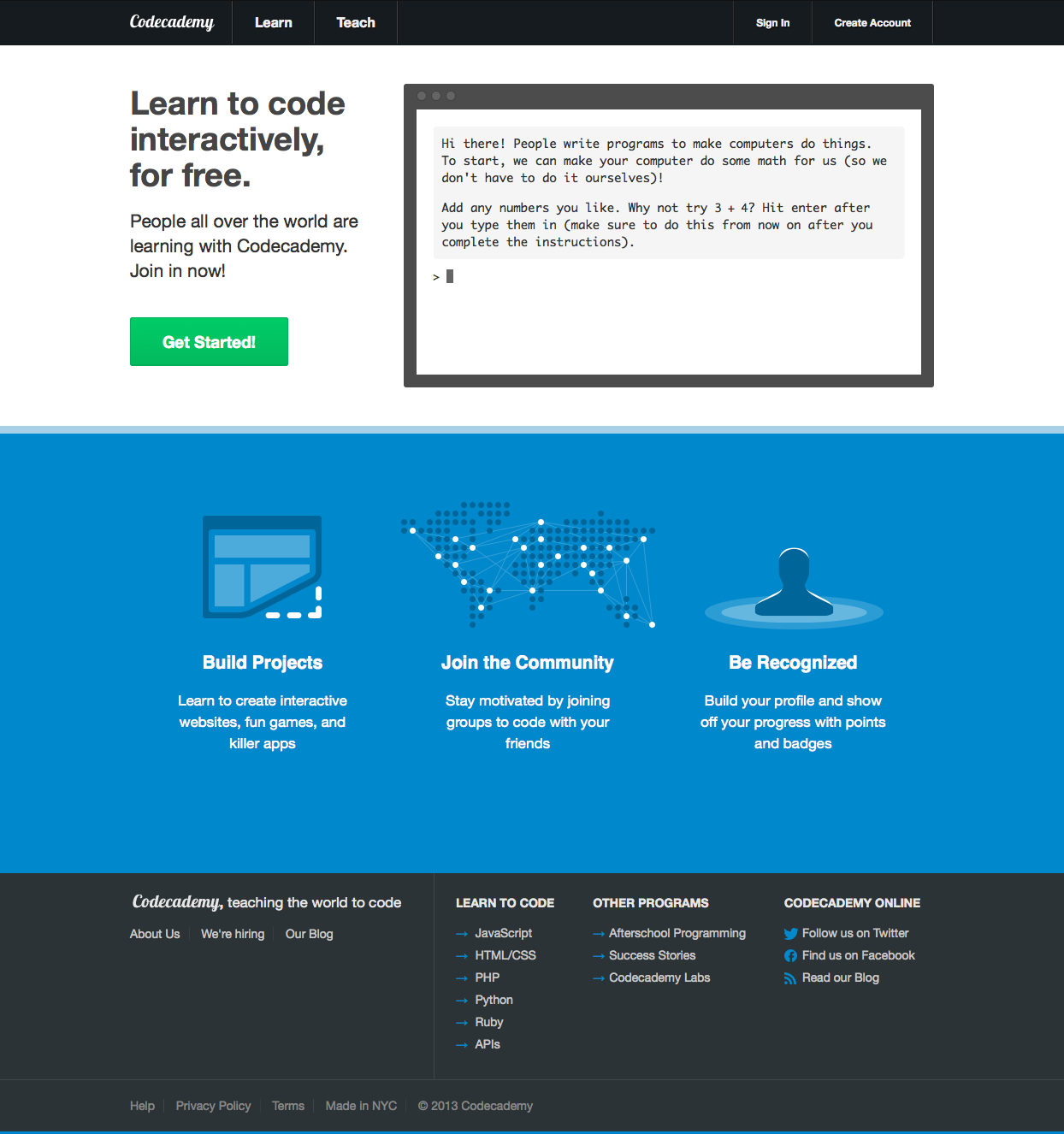
Learn to code interactively, for free. Click HERE to begin
Go to: Scratch Curriculum Guide
BASIC EXAMPLES:

Students created Sprite
Making their Sprite dance
SCRATCH PROJECT EXAMPLES – HARVARD ONLINE INTRO TO COMPUTER SCIENCE
 Ed Tech Integrated